

What is ClassCharts?
Features
ClassCharts is a website and mobile phone app which allows you to track your child’s behaviour, attendance records, view their timetable & homework tasks.
You can also use it to send messages to the school and view announcements.
How do I sign up for ClassCharts?
You will receive a Parent Code from the school to allow you to set up your ClassCharts Parent account. These will be distributed to pupils and parents at the start of Year 7.
If you have not received this code, please use this form to contact the pastoral team.
You will then be able to sign up on the ClassCharts website. You will need your email address, and your child’s date of birth.
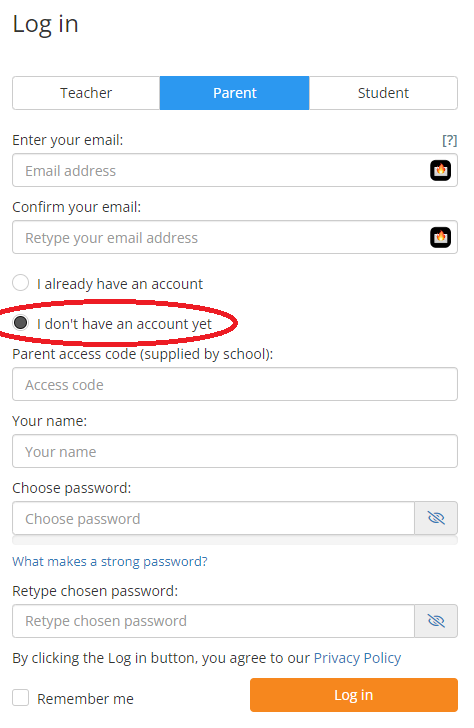
On the classcharts website, choose the option to Log In, and then select “I don’t have an account yet“.
The form will change to allow you to enter your Parent Code and to set a password.
Once you are signed up, you can access information on the app and on the website.
Is there a complete guide for parents and carers?
ClassCharts have a Quick Start Guide for parents and carers with everything you need to know to get started. Click here to download a copy.
I have a problem logging in to ClassCharts
- I don’t have a code
Contact us to get a code to register. - I cannot log in
Please check you are using the correct email address. If you have forgotten your password then you can use the password reset feature. - I still need help
If you are still having issues, please Contact us